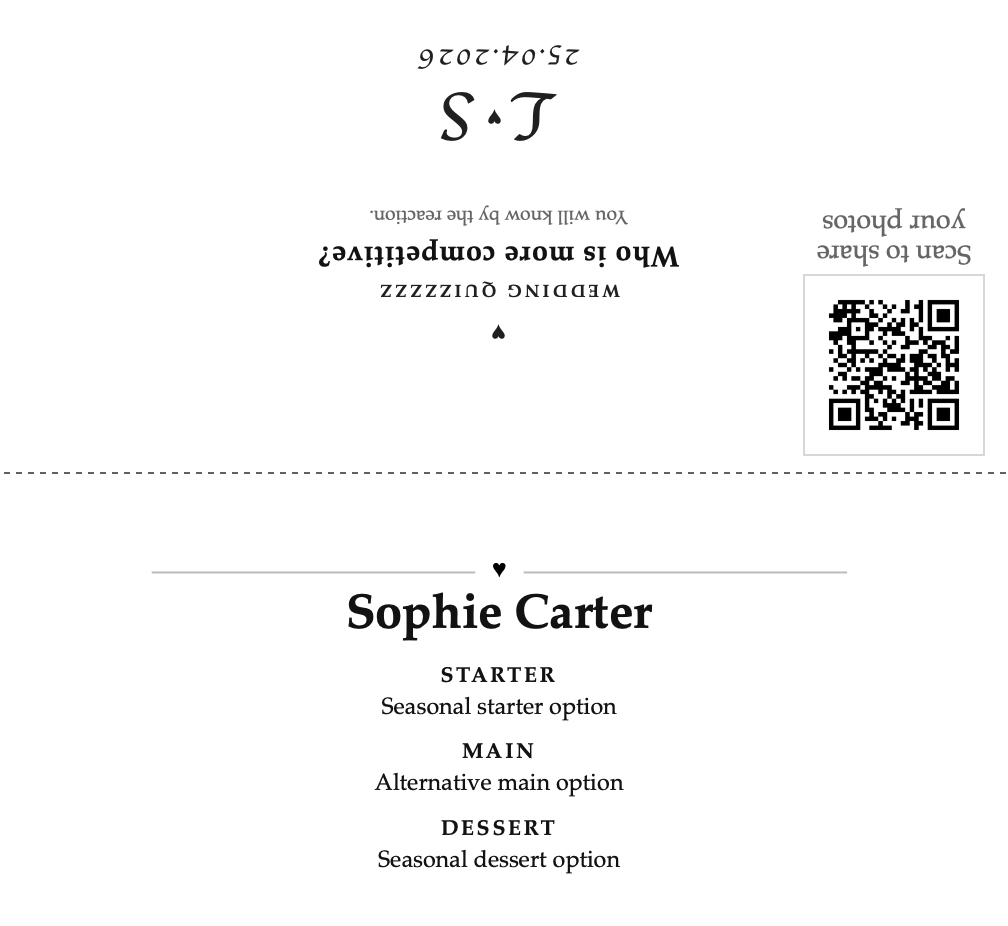
Event Menu Cards From A Spreadsheet

Turn one guest spreadsheet into the full set of menu cards.

Upload the guest list, choose the back, and export the whole set when it is ready. Use it for weddings, birthdays, dinner parties, or client work.

Weddings, birthdays, and dinners Planners, venues, and studios Low-ink default

Enter your email.

We send a sign-in code so you can start the setup.

Example spreadsheet

Most people start on phone, then finish and export on laptop.

Spreadsheet in Guest names, menu choices, dietary notes, and optional per-guest back text all come from one upload.
Home print or client handoff Use Easy A4 cutout for the fastest first run, or switch to Folded A6 when you want the larger presentation format.
Built for hosts and teams Use the same workflow whether you are printing your own cards or producing them for a client.
Buy a one-off credit pack when needed The app is set up before payment. Each payment buys 100 credits for £7, with no subscription.
Built For Two Paths

Use it yourself or offer it as a service.

The workflow is the same either way: one spreadsheet in, one full set of guest cards out, with late edits handled from the data instead of one card at a time.

For hosts

Print at home and keep the cost down

Start with the black-and-white version, get the first print working quickly, and re-export when names, menus, or dietary notes change.

  • No Canva, mail merge, or copy and paste across cards
  • Easy A4 cutout keeps the first print practical
  • Late menu or guest changes stay manageable
For businesses

Turn client spreadsheets into finished cards faster

Useful for planners, venues, stationers, and small print studios who want a repeatable menu-card workflow instead of fixing each card by hand.

  • Share the example spreadsheet so clients know the format
  • Regenerate the full set when customer changes come in
  • Add styling upgrades after the base version works
Why Buy This

Faster than editing template cards one by one.

Whether you are hosting your own event or delivering it for someone else, the win is removing repetitive card edits.

DIY template

Canva, Word, or manual studio edits

  • Still requires manual copy and paste for each guest
  • Dietary notes and long menu lines still need hand-fixing
  • Late guest-list changes create more work at the worst time
  • Client changes mean another round of manual edits
How It Works

Keep the path from interest to export short.

You can browse on your phone, but most people finish the spreadsheet and export on laptop.

1

Upload your spreadsheet

Use the example sheet, then export from Excel, Google Sheets, or Numbers before uploading names, courses, and dietary notes in one go.

2

Choose the back

Keep the recommended Random quiz, switch to Custom text when you have your wording, or use Sharing photos when you have the album link ready and want the app to generate the QR.

3

Review, buy a one-off pack, and print

Buy a one-off pack of 100 credits for £7, then use 1 credit for preview and 1 credit for download when the project is ready.

Common Questions

Remove friction before checkout.

Do I need design software?

No. The whole point is to avoid rebuilding these manually in Canva, Word, or PowerPoint. Upload the inputs, then export the finished print file.

Do I need a QR code?

No. A QR code is only needed for Sharing photos mode, and the app can generate it for you from the photo-sharing link. Random quiz and Custom text work without it, and they are the fastest route to checkout.

How does the pricing work?

Each payment is a one-off pack of 100 credits for £7. There is no subscription or automatic renewal. Preview uses 1 credit and download uses 1 credit.

Can I print these myself?

Yes. The export is a print-ready HTML layout. Easy A4 cutout is the default, and Folded A6 is available if you want the larger option.

Will these use a lot of ink?

No. The default card style is black and white so it stays practical for home printing. Decorative artwork is optional rather than required.

Can I use my own guest spreadsheet?

Yes. Use your own Google Sheets, Excel, or Numbers sheet. The guide shows the columns to use and how to export it before uploading.

Can I customise the back of each card?

Yes. You can keep one shared back message for the full set, use random quiz mode, use photo sharing with an auto-generated or uploaded QR code, or switch to Custom text and override the top, middle, and bottom back lines per guest from the spreadsheet export.

What if guest choices change late?

Update the spreadsheet, regenerate the cards, and download the new print file. That is one of the main reasons to use this instead of static templates.

Start Free Setup

Start with your email, then build the real job when you are ready.

Use the same flow whether this is your own event or a client order. Save the setup first. Buy a one-off credit pack only when you want to preview or download.

Use the same setup whether you are printing your own cards or offering the service to clients. Payment only happens once the project is ready to export.

One-off pack: 100 credits for £7

No subscription. Preview uses 1 credit. Download uses 1 credit. Everything else in the setup is free.

Print at home Client service Dietary notes Custom back text Low-ink default
Start free setup Save the project now and finish the spreadsheet on laptop.
Start free